
Last Updated 9th July 2026.
For many UK families, a Florida fly-drive holiday is the trip of a lifetime. The Sunshine State has more toll roads than any other state in the US, and rental car companies know it. Many will offer you an all-inclusive toll package at the desk. Some charge £8-£15 per day just for the convenience of using it, before you have passed a single toll booth.
The solution is straightforward, free to use and surprisingly unknown among first-time UK visitors: the Visitor Toll Pass.
This guide covers everything you need to know from setting up the app in the UK before you fly, to collecting your pass at Orlando International Airport, activating it correctly before leaving the car park, and returning it safely before your flight home. Before you plan your route through Florida, it is also worth knowing that SmartTrack, Smarter Car Hire Florida's exclusive automatic price tracking system, monitors the live cost of your hire car booking every day and automatically rebooks you at a lower rate if one becomes available, so you are already saving money before you arrive at the airport.
This guide covers Visitor Toll Pass specifically. For E-PASS, SunPass, rental strategy, all airports, see our Florida toll roads master guide for UK drivers.
What is the Visitor Toll Pass?
The Visitor Toll Pass is a free-to-borrow electronic transponder, a small plastic hangtag designed exclusively for visitors flying in and out of Orlando International Airport (MCO). The Central Florida Expressway Authority (CFX), a Florida government agency, operates the programme.
Why it is the smart choice for UK visitors:
Zero daily fees. Unlike rental companies that charge £8–£15 per day, the Visitor Toll Pass carries no daily administration fee.
Lowest available rates. You pay the SunPass electronic rate, the same rate Florida residents pay saving up to 80% compared to rental car toll programmes.
State wide coverage. It works on every toll road and bridge in Florida, from the Florida Turnpike to the Everglades Parkway and beyond.
Works with every Smarter Car Hire Florida partner. Whichever of our seven partner suppliers you book with, Hertz, Alamo, Dollar, Thrifty, SIXT, Enterprise, or National, the Visitor Toll Pass works in your hire car without exception.
Ready to book your Florida hire car?
Get live quotes from all seven of our partner suppliers in one search, plus SmartTrack, which keeps monitoring your price after you book and automatically moves you to a lower rate if one appears.
Pre-flight preparation: Setting up in the UK
A few minutes of preparation before you leave home will make your arrival at Orlando International Airport (MCO) significantly smoother.
Download the app before you fly
Download the Visitor Toll Pass app from the UK App Store or Google Play Store before your departure. Create your account, register your payment card and familiarise yourself with the interface while you have a reliable Wi-Fi connection at home.
Top Tip. Make sure that you use a card with no foreign transaction fees.
UK bank card registration: What you need to know
When you register your card in the app, the app charges a $10 deposit. The system applies this deposit against your toll transactions during the trip. If your total toll usage is less than $10, CFX refunds the remaining balance to your card within five working days of returning the pass
Important for UK bank card users: In recent months (2026), UK travellers using banks including Barclays, HSBC and Lloyds have reported authentication failures during card registration. This occurs because many UK banks apply 3D Secure verification, an additional security step that confirms your identity when you initiate a new international transaction, and the VTP app's registration process can occasionally conflict with this.
This happened to me in early 2026. After returning from a trip, I received a call from CFX asking for me to apply a different card as they were unable to take payment. I did this via the app, and everything worked and processed as it should. This is the only occasion that I have experienced any issue in many years of using the Visitor Toll Pass , and I would highly recommend anyone flying into Orlando International Airport and intending to use toll roads to use this service.
The fix: When registering your card, ensure your UK banking app is open and that international transactions are enabled in your settings. The $10 registration charge will trigger a verification request from your bank. Check your banking app for a pending approval notification and confirm it promptly. If the registration screen freezes, do not close the app, wait for the notification from your bank first.
Using a travel-focused card such as Monzo, Starling or Revolut significantly reduces the likelihood of these friction points, as these providers apply less restrictive authentication to international transactions.
Arrival at MCO: Which terminal is your kiosk in?
Finding your Visitor Toll Pass kiosk at MCO is straightforward once you know which terminal your flight arrives into. In 2026, this depends on both your airline and your travel dates.
Terminal C: Virgin Atlantic, British Airways, and Aer Lingus
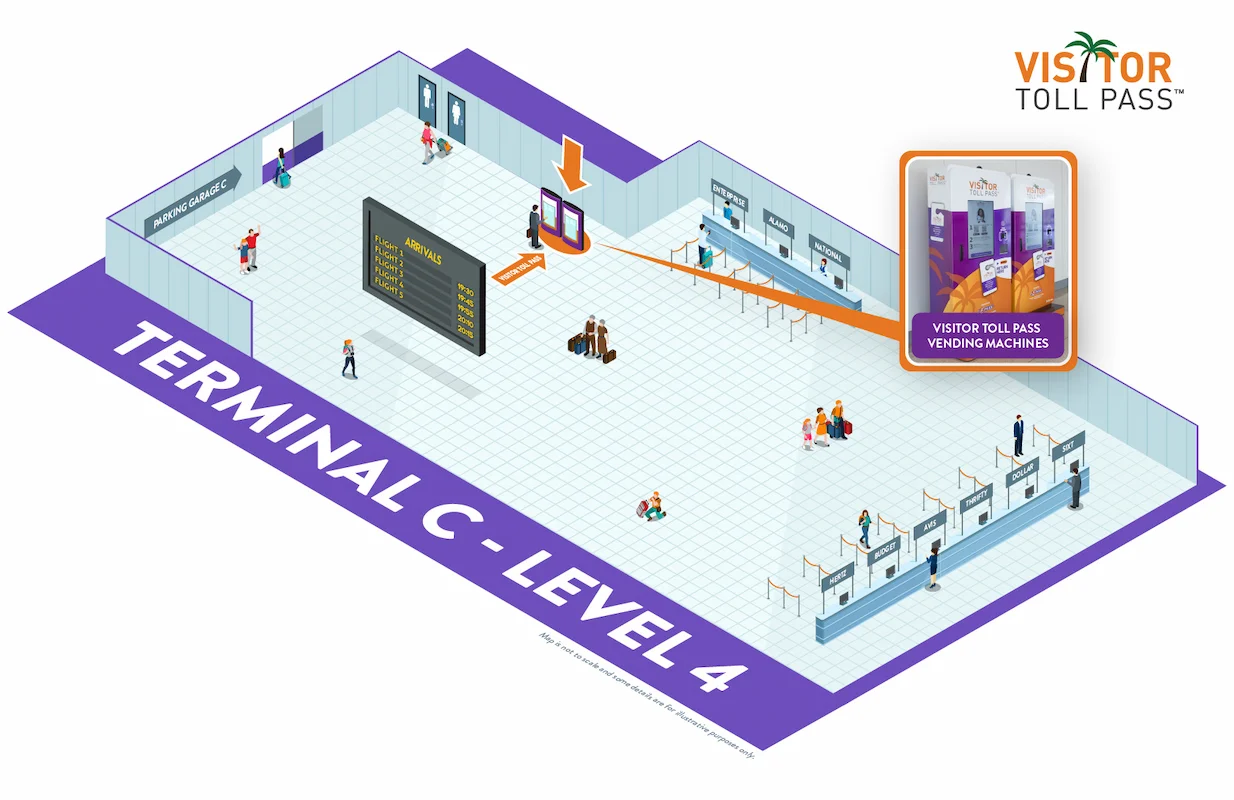
The diagram above is reproduced from the official Visitor Toll Pass website, where you can also find the latest terminal maps and kiosk updates.
Terminal C is MCO's newest terminal. You will find the Visitor Toll Pass kiosks on Level 4, close to the Hertz and Alamo rental desks.
The following UK carriers arrive into Terminal C:
British Airways
Aer Lingus
Virgin Atlantic
Terminal A: Indirect arrivals from the UK
Since Virgin Atlantic's transition to terminal C in June 2026, terminal A at Orlando International Airport is primarily used by U.S airlines who provide routes from across the country into MCO.
Terminal A is MCO's main international arrivals terminal. You will find the Visitor Toll Pass kiosks on Level 1, next to the car rental counters.
The diagram below shows the exact kiosk location within Terminal A.
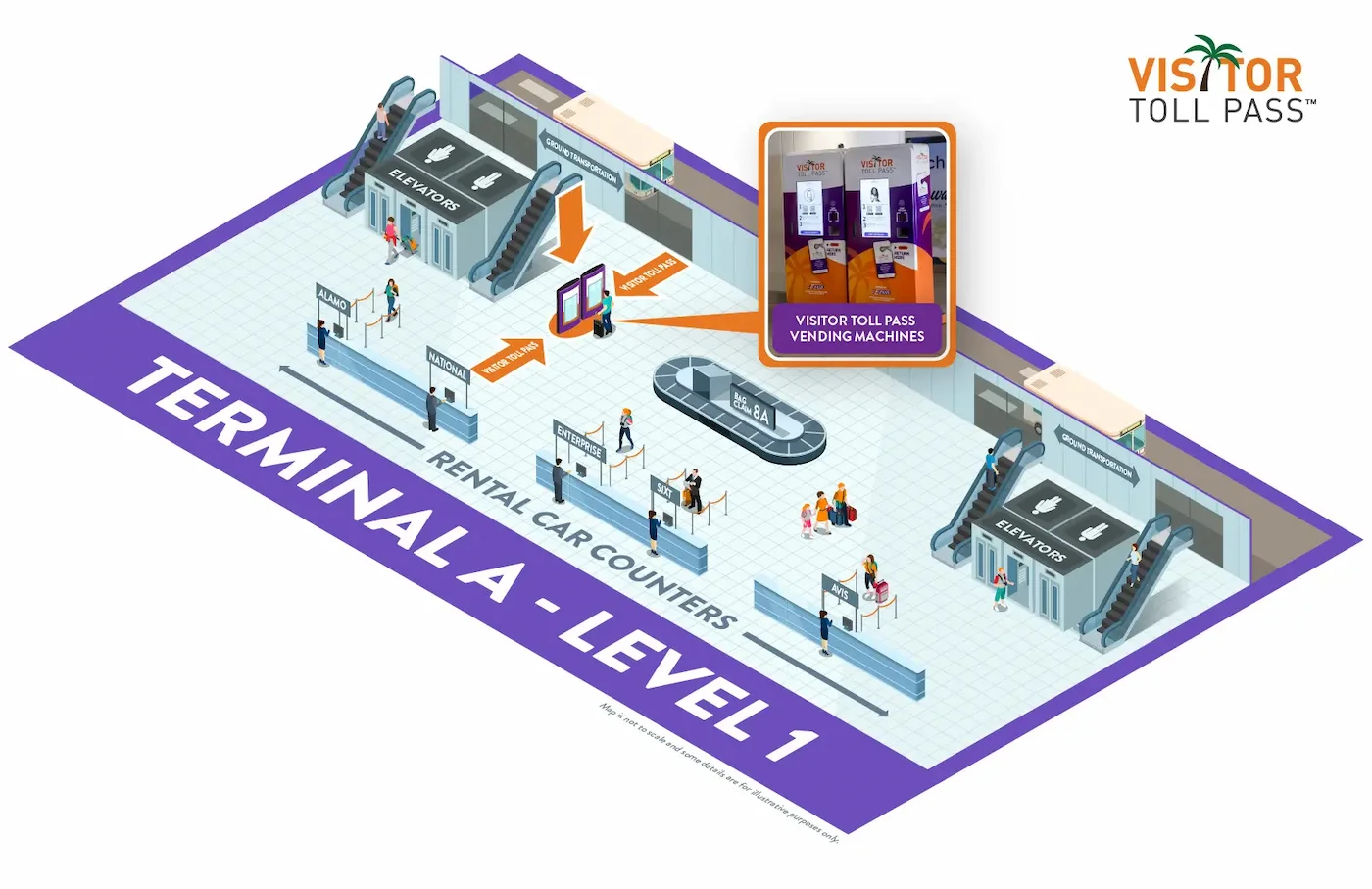
The diagram above is reproduced from the official Visitor Toll Pass website, where you can also find the latest terminal maps and kiosk updates.
Terminal B: Other carriers
Terminal B is part of MCO's main terminal building, connected to Terminal A on the same level. The Visitor Toll Pass kiosks are located on Level 1, next to the car rental counters.
The diagram below shows the exact kiosk location within Terminal B.
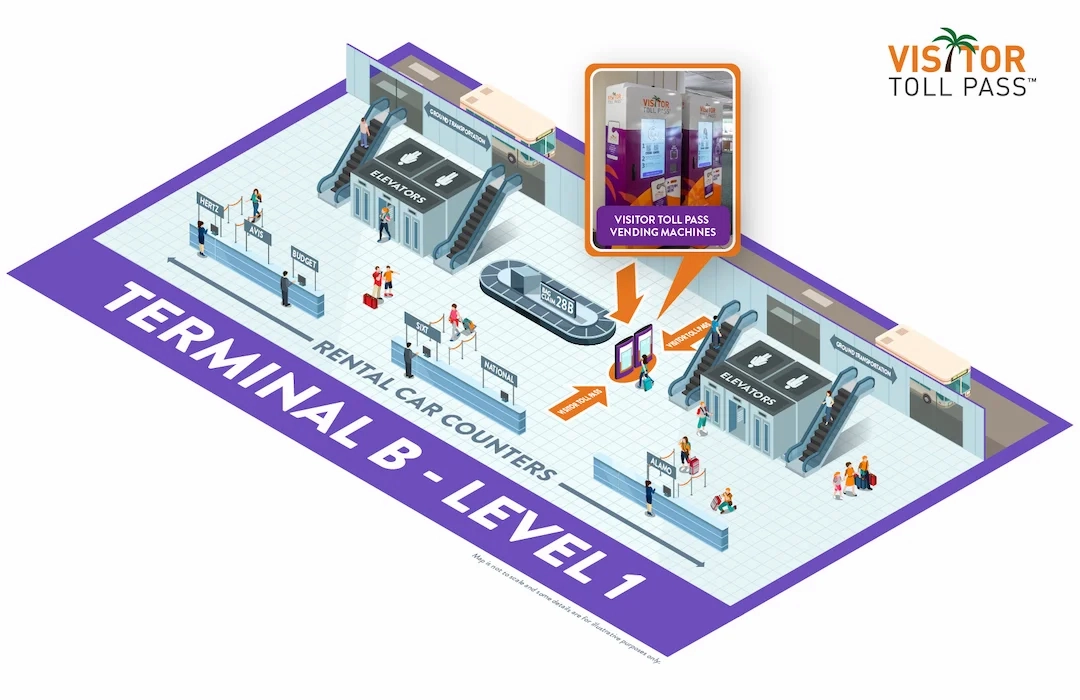
The diagram above is reproduced from the official Visitor Toll Pass website. where you can also find the latest terminal maps and kiosk updates.
Not sure which terminal you arrive into? Always check your boarding pass before you travel. Your arrival terminal is printed on your boarding pass and shown in your airline's app. Do not rely solely on this guide for terminal confirmation.
Always check your boarding pass
Terminal assignments can and do change. Always confirm your arrival terminal on your boarding pass before you travel. Do not rely solely on this guide for arrival or departure planning.
Collecting your pass
Once you have located the kiosk, the collection process is quick. Scan the QR code from your Visitor Toll Pass app at the kiosk screen. The machine dispenses a plastic hangtag in under 30 seconds. You are now ready to move through to the rental car desks.
Before you leave the airport: Activating your pass
Collecting the hangtag from the kiosk is not the final step. Before your Visitor Toll Pass is active and ready to pay tolls, you must complete two actions, and you must complete both before you drive out of the car rental garage.
Step 1: Add your rental vehicle's licence plate number to the app
The Visitor Toll Pass system integrates with technology located around the exits of the rental car garages at MCO. This is designed to automatically linked your vehicles registration number to your Visitor Toll Pass account. If you would rather manually enter the registration details into the Visitor Toll Pass app prior to leaving the garage, you can do so by following the next steps.
Once you have collected your hire car from the rental desk, you need the vehicle's registration number (licence plate number), which is located on the rear of the car.
Open the Visitor Toll Pass app and follow these steps:
Tap Account in the bottom menu to 'Update my trip'
Select Trip Information
Enter the licence plate number and select Florida as the state
Tap Update
You will receive a notification confirming your pass is active and your trip is live. The system may take up to 90 minutes to fully confirm the plate pairing — this is normal. If any issue arises, you will see an alert in the app's notification centre.
Do not drive on a toll road until you have completed this step. If you pass a toll point before your licence plate is in the app, your pass may not cover the toll. The overhead camera will capture your hire car's plate and your rental company will bill the charge, plus any associated fees directly to you.
The MCO Wi-Fi tip: Complete the app update in the terminal, not the garage
Here is something that catches a significant number of UK visitors out every year. The MCO rental car garages are large, enclosed multi-storey structures. Mobile phone signal inside them is frequently weak or absent, particularly on the lower levels where the rental car collection points sit. This is not a theoretical risk. Our team has experienced complete signal loss in the MCO rental car garage on multiple visits, across different networks and at different times of year.
Orlando International Airport provides free Wi-Fi throughout all public terminal areas on the network named MCO Internet, provided by the Greater Orlando Aviation Authority. However, this Wi-Fi signal does not reliably extend into the enclosed rental car garages.
The practical tip: Do not wait until you are standing next to your hire car in the garage to add your licence plate number to the app. Instead, complete the licence plate update while you are still inside the terminal, either at baggage reclaim while waiting for your luggage, or immediately after collecting your hangtag from the kiosk. Connect to MCO Internet Wi-Fi and complete the update there. By the time you reach your car, you will have already updated the app and your pass will be activating.
If you find yourself in the garage without a signal: Do not panic and do not drive out. This has happened to us more than once at MCO, and it happens to a significant number of UK visitors every year. Walk back towards the terminal building. Signal typically returns within a short distance of the terminal entrance. Connect to the MCO Internet Wi-Fi network, update your licence plate number, wait for confirmation and then proceed to your car.
Step 2: Hang the hangtag on the rear-view mirror
Hang the Visitor Toll Pass hangtag from the arm of the rear-view mirror before you leave the airport. It can face either direction, Florida's electronic toll sensors accept both orientations. Leave it in place for the entire duration of your holiday. Do not remove it, store it in the glove box or place it on the dashboard. The overhead sensors at toll points detect the hangtag most reliably at mirror height. Placing it elsewhere may result in a missed toll read.
What to check before driving away
Before pulling out of the garage, run through this quick checklist:
Licence plate number added to the app ✅
Confirmation notification received, or app shows trip as live ✅
Hangtag hung from the rear-view mirror ✅
Rental company's toll programme declined at the desk ✅
Any built-in rental car toll device confirmed as inactive ✅
When all five are confirmed, you are ready to drive. Your Visitor Toll Pass covers every toll road in Florida, from the Florida Turnpike to the Beachline Expressway from the moment you leave the airport.
Driving in Florida: The UK driver's checklist
Driving on the right-hand side of the road is easier than you might expect. However, three Florida-specific rules every UK driver must know before setting off.
Turn right on red
Unless a sign explicitly states "No Turn on Red," the law permits you to turn right at a red traffic light after coming to a complete stop and giving way to oncoming traffic and pedestrians. This rule applies at the vast majority of junctions throughout Florida. Always come to a complete stop first, do not treat it as a give way.
Declining the rental company's toll programme
Before you leave the rental desk, verbally decline the rental company's toll programme. Do not wait until you are in the garage, decline it when you sign the paperwork at the desk.
If the rental company's toll system runs on your vehicle alongside your Visitor Toll Pass hangtag, you risk paying double for every toll you pass through. This is the single most important conversation you will have at the rental desk. Be clear and direct: tell the agent you are using the Visitor Toll Pass and do not wish to add the company's toll product.
The Move Over Law
Florida's Move Over Law requires all drivers to take action when approaching any stationary vehicle on the hard shoulder with its lights or hazard lights on. Following an expansion of the law in January 2025, this now covers all vehicles displaying hazard lights on the hard shoulder, not only emergency services vehicles. Police cars, ambulances, tow trucks and broken-down private vehicles all fall under this rule.
If you can safely move over one lane away from the stationary vehicle, you must do so. If traffic conditions prevent a safe lane change, you must reduce your speed to 20 miles per hour below the posted speed limit. Failure to comply carries a fine and potential penalty points.
For the complete guide to driving in Florida as a UK visitor, read the Driving in Florida Complete Guide for UK Visitors.
Returning the pass: Avoid the additional fee
Your Visitor Toll Pass reservation runs for up to 90 days, but the programme designs it exclusively for round-trip visitors. You must return the physical hangtag to MCO before you fly back to the UK.
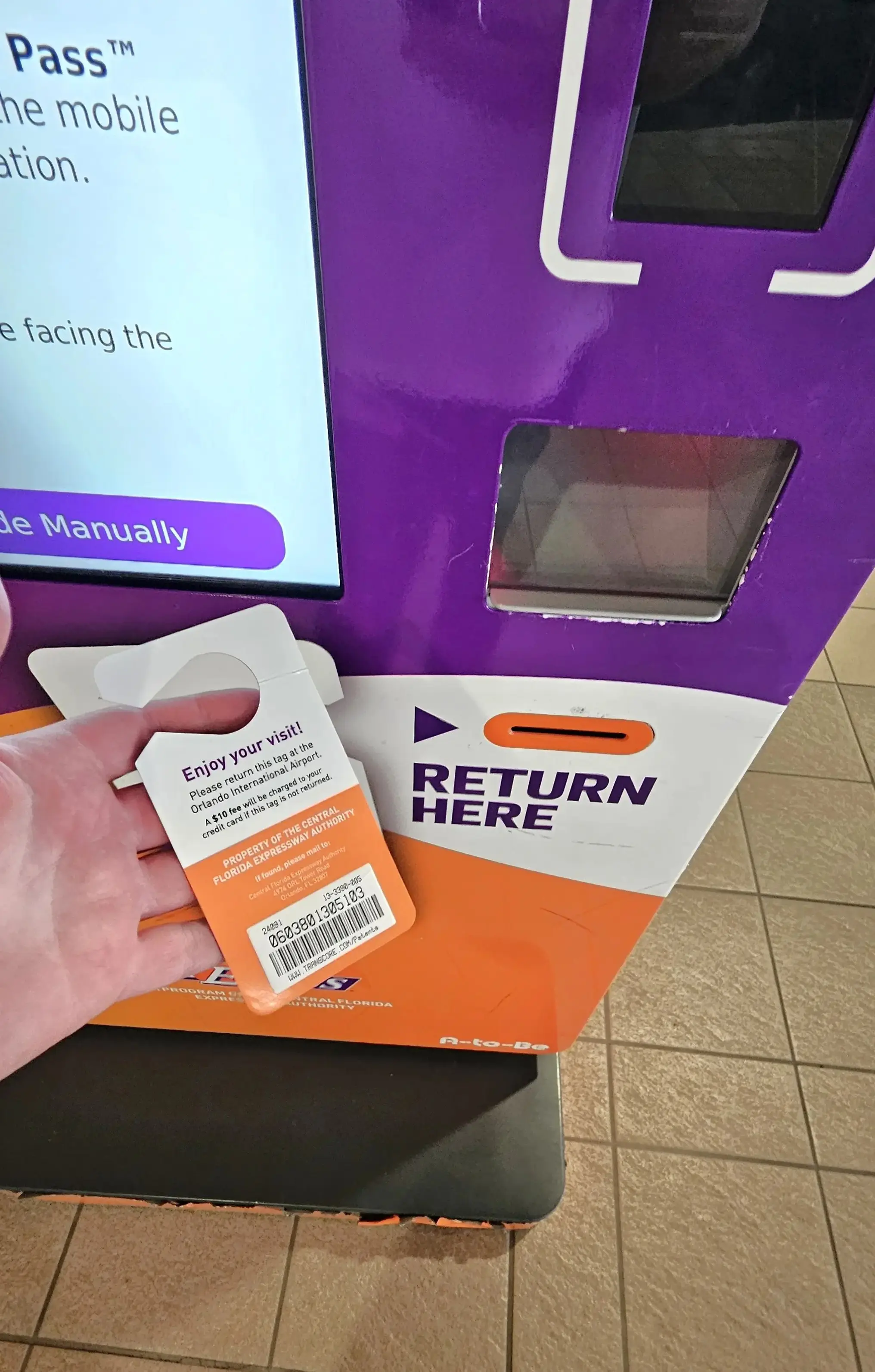
Drop-off locations
Look for the bright blue drop boxes near the rental car return elevators in all terminals and inside the parking garages. Clear signage directs you to them throughout the terminal and garage areas.
What happens if you do not return the pass
If you fail to return the hangtag, CFX will charge you an additional $10 unreturned tag fee on top of your toll transactions. This fee does not cancel or absorb your tolls — CFX charges your tolls separately in full. The financial consequence of not returning the pass is your total toll charges plus an extra $10 on top.
The return tip
Take a quick photograph of yourself placing the tag in the drop box before you leave. If the system fails to log your return correctly, this photograph serves as your evidence for a refund claim. If you experience any issue with a return, contact the Visitor Toll Pass customer service team directly on +1 407-690-5300.
Visitor Toll Pass FAQs
-
The Central Florida Expressway Authority (CFX) operates the Visitor Toll Pass programme under its own Customer Agreement and Privacy Policy. Under this agreement, CFX does not sell or share your customer information with outside marketers, and your personal identifying information is generally exempt from disclosure under Florida's public records law. For full details on how your data and payment information are handled, refer to CFX's official Customer Agreement and Privacy Policy at visitortollpass.com.
-
Virgin Atlantic uses Terminal C at MCO. This is the airports newest terminal which has a bag collection first process prior to clearing customs. All car hire desks are located on level 4.
-
No. Only Orlando International Airport (MCO) offers the physical hangtag kiosks. If you are flying into Miami International (MIA) or Tampa International (TPA), your best alternative is to purchase a SunPass Mini (approximately $4.99 / £4) from a local CVS, Walgreens or Publix supermarket. You will need to create a free account at SunPass.com.
Note that access to sunpass.com from UK IP addresses is inconsistent, some UK visitors can access it without difficulty, while others encounter an access denied security block depending on their internet service provider. If you can access the site from your UK connection, you can register your SunPass account through the website directly. If you encounter a block, the SunPass mobile app carries no such restriction and is the correct alternative. If you specifically need website access and are being blocked, connecting via a reputable VPN service set to a US server will typically resolve the issue. Register the device to your hire car and pre-load it with funds before using any toll roads.
-
No. Unfortunately not at your arrival airport. TUI flights from the UK do not fly into Orlando International Airport (MCO). TUI operates from Melbourne Orlando International Airport (MLB), a separate airport approximately 110 kilometres south-east of Orlando city centre. Only MCO carries the Visitor Toll Pass kiosks. If you arrive on a TUI flight, your best alternative is to purchase a SunPass Mini (approximately $4.99 / £4) from a CVS, Walgreens or Publix store near your accommodation on your first day. Create a free account at SunPass.com, register the device to your hire car and pre-load it with funds before driving on any toll roads. The same alternative applies if you arrive at any Florida airport other than MCO.
Please note that access to sunpass.com from UK IP addresses is inconsistent, some UK visitors can access it without difficulty, while others encounter an access denied security block. If you are blocked, the SunPass mobile app carries no such restriction. If you specifically need website access, connecting via a reputable VPN service set to a US server will typically resolve the issue.
Final thoughts
The Visitor Toll Pass is one of the simplest and most effective ways to reduce the cost of your Florida holiday. By using it, you bypass the daily fees rental companies charge and pay exactly the same toll rates as a Florida resident. Over a two-week trip, the savings can be substantial, potentially enough to cover a family dinner, a tank of fuel or a day out.
For complete peace of mind on the cost of your hire car itself, SmartTrack, Smarter Car Hire Florida's exclusive automatic price tracking system monitors the live cost of your booking every single day and automatically rebooks you at a lower rate whenever one becomes available. No action is required from you. You simply receive a confirmation email telling you exactly how much you have saved.
Find out more about zero deposit Florida car hire, our fully inclusive insurance options and how SmartTrack works, or explore our full library of Florida car hire guides for everything else you need to know before you drive.
Ready to Book Your Florida Car Hire?
You have just taken care of your tolls. Now let SmartTrack take care of your hire car price.
Smarter Car Hire Florida books your Florida hire car with zero deposit, zero excess insurance and free cancellation up to 48 hours before collection.
About the author
Rob has been travelling to Florida since the early 1990s, first as a parent bringing his young family to explore the Sunshine State, and later as a property owner in the Orlando area. That first-hand experience of Florida family holidays, including real frustrations at the hire car counter, shaped everything Smarter Car Hire Florida was built to solve. In 2006, Rob co-founded Direct Villas UK Ltd (Company No. 06009413), the UK-registered business behind Smarter Car Hire Florida, with the goal of giving UK families honest, practical, and genuinely helpful guidance on every aspect of visiting Florida, including getting the car hire right.
Read more about our terms and conditions & privacy policy
Reviewed July 2026


